Hp XP Racks Instrukcja Użytkownika Strona 241
- Strona / 486
- Spis treści
- ROZWIĄZYWANIE PROBLEMÓW
- BOOKMARKI

- Abstract 1
- DescriptionDateEdition 2
- Contents 3
- 4 Contents 4
- Contents 5 5
- 6 Contents 6
- Contents 7 7
- 8 Contents 8
- Contents 9 9
- 10 Contents 10
- Contents 11 11
- 12 Contents 12
- About provisioning 13
- Basic provisioning 13
- Fixed-sized provisioning 13
- Disadvantages 14
- Custom-sized provisioning 15
- Basic provisioning workflow 15
- Thin Provisioning Overview 16
- Thin Provisioning 16
- Thin Provisioning concepts 16
- When to use Thin Provisioning 17
- Thin Provisioning advantages 17
- Thin Provisioning work flow 18
- Smart Tiers 18
- Tiers concept 19
- When to use Smart Tiers 20
- Data retention strategies 20
- Resource groups strategies 20
- Complimentary strategies 20
- Key terms 21
- Before you begin 21
- System requirements 22
- Shared memory requirements 22
- Displaying pair information 25
- 3 Configuring resource groups 27
- Resource groups examples 29 29
- Meta_resource 30
- Resource lock 30
- User groups 30
- Resource group assignments 30
- Creating a resource group 31
- Managing Resource Groups 33
- Deleting a resource group 34
- DKA Encryption 35
- LUN Manager 35
- Performance Monitor 37
- Business Copy 37
- Fast Snap 37
- Continuous Access Synchronous 38
- Continuous Access Journal 38
- External Storage 39
- Open Volume Management 41
- Cache Partition 41
- Auto LUN 41
- Volume Shredder 42
- Performance Control 42
- Virtual LUN functions 43
- Virtual LUN requirements 43
- Virtual LUN specifications 43
- SSID requirements 44
- Virtual LUN size calculations 44
- Capacity of a slot 47
- Create LDEV function 48
- Create LDEV function 49 49
- Finding an LDEV ID 51
- Finding an LDEV SSID 51
- Editing an LDEV SSID 51
- Blocking LDEVs 52
- Restoring blocked LDEVs 53
- Editing an LDEV name 54
- Formatting LDEVs 55
- Quick Format function 56
- Quick Format specifications 57
- Formatting a specific LDEV 58
- Assigning an MP blade 59
- Thin Provisioning overview 61
- Smart Tiers overview 61
- Pool-VOL requirements 62
- THP V-VOL requirements 64
- Cache Partition CLPR setting 72
- Thin Provisioning workflow 73
- Smart Tiers 75 75
- Smart Tiers 79 79
- Tier relocation flow 80
- Smart Tiers 81 81
- Buffer area of a tier 85
- Smart Tiers 87 87
- Smart Tiers 89 89
- Smart Tiers 91 91
- Period mode 92
- Continuous mode 92
- ◦ Auto execution mode 93
- Tiering policy 97
- Tiering policy expansion 98
- Tiering policy examples 98
- Smart Tiers 99 99
- Tiering policy levels 100
- New page assignment tier 105
- Relocation priority 106
- Formatted pool capacity 108
- Smart Tiers 109 109
- Changing a tiering policy 111
- Smart Tiers workflow 113
- Task and parameter settings 115
- Managing Smart Tiers 117
- Smart Tiers 119 119
- Changing relocation speed 120
- Viewing pool tier information 121
- Working with pools 122
- Pool status 123
- Creating a pool 123
- Working with pools 125 125
- Working with pools 127 127
- Working with pools 129 129
- Working with pools 131 131
- Working with THP V-VOLs 132
- Creating V-VOLs 133
- Working with THP V-VOLs 135 135
- Changing THP V-VOL settings 136
- Monitoring pool capacity 136
- Monitoring pool usage levels 137
- Monitoring performance 137
- Thresholds 139
- Changing pool thresholds 140
- Working with SIMs 141
- Manually completing a SIM 142
- Managing pools and THP V-VOLs 143
- Increasing pool capacity 144
- Changing a pool name 145
- Recovering a blocked pool 146
- Decrease pool capacity 146
- Decreasing pool capacity 148
- Deleting a tier in a pool 149
- Deleting a pool 150
- Increasing THP V-VOL capacity 151
- Deleting a THP V-VOL 154
- About access attributes 157
- Access attribute requirements 157
- Access attribute restrictions 158
- Access attributes work flow 158
- Disabling an S-VOL 162
- Reserving volumes 162
- Reserving volumes 163 163
- 7 Managing logical volumes 164
- LUN Manager overview 165 165
- Restrictions 166
- Guidelines 166
- Configuring hosts 169
- Configure hosts workflow 170
- Host modes for host groups 170
- Host mode options 171
- Finding a WWN on Windows 173
- Finding WWN for HP-UX 174
- 176 Managing logical volumes 176
- Configuring LU paths 177
- Setting a UUID 178
- Defining alternate LU paths 179
- 180 Managing logical volumes 180
- Managing LU paths 181
- Prerequisites 182
- LUN security on ports 183
- 184 Managing logical volumes 184
- User authentication 185
- 186 Managing logical volumes 186
- 188 Managing logical volumes 188
- 190 Managing logical volumes 190
- Fibre channel authentication 191
- 192 Managing logical volumes 192
- 194 Managing logical volumes 194
- 196 Managing logical volumes 196
- 198 Managing logical volumes 198
- Managing hosts 199
- Initializing host group 0 200
- Deleting a host group 201
- 8 Troubleshooting 202
- ◦ Path blockage 206
- 9 Support and other resources 210
- Typographic conventions 211
- Resource Group window 215
- Resource Groups tab 216
- Parity Groups tab 217
- LDEVs tab 218
- Ports tab 220
- Host Groups tab 221
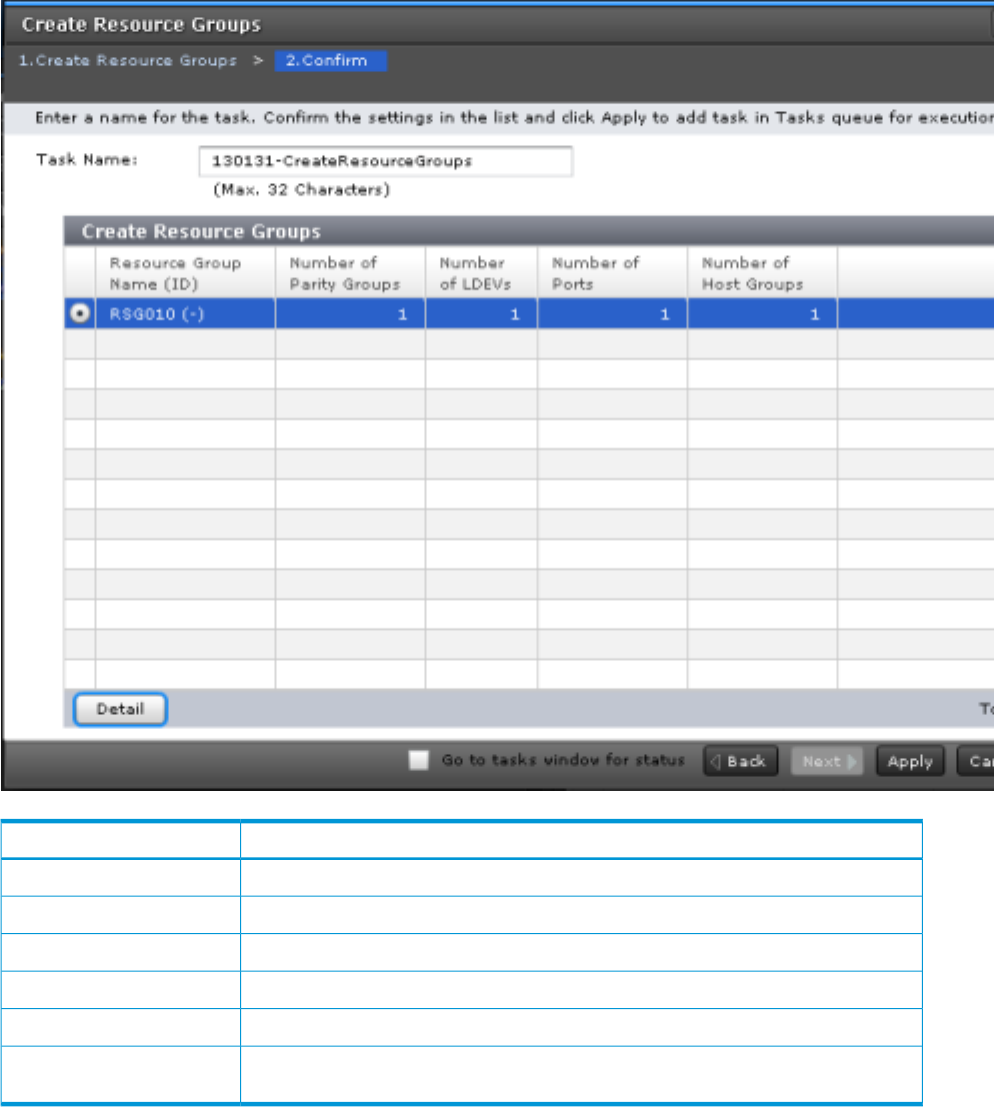
- Create Resource Groups wizard 222
- Setting fields 223
- DescriptionItem 225
- Select Parity Groups window 226
- Available Parity Groups table 227
- Selected Parity Groups table 228
- Select LDEVs window 229
- Available LDEVs table 230
- Selected LDEVs table 232
- Select Ports window 233
- Available Ports table 234
- Selected Ports table 236
- Select Host Groups window 237
- Available Host Groups table 238
- Selected Host Groups table 240
- Edit Resource Group wizard 242
- Selected Resource Group tab 243
- Add Resources wizard 244
- Add Resources Confirm window 245
- Selected Resource Group table 246
- Remove Resources window 248
- Delete Resource Groups window 250
- Parity Groups table 252
- LDEVs table 252
- Ports table 253
- Host Groups table 253
- C LDEV GUI reference 254
- • “Summary” 256
- • “Parity Groups tab” 256
- • “LDEVs tab” 258
- Logical Devices window 260
- Create LDEVs wizard 264
- Create LDEVs wizard 265 265
- Create LDEVs Confirm window 271
- Edit LDEVs wizard 273
- Edit LDEVs Confirm window 275
- Change LDEV Settings window 277
- View SSIDs window 279
- Select Free Spaces window 280
- Select Pool window 282
- View LDEV IDs window 283
- View Physical Location window 285
- Edit SSIDs window 286
- Change SSIDs window 288
- Format LDEVs wizard 289
- Format LDEVs window 290
- Format LDEVs Confirm window 290
- Restore LDEVs window 292
- Block LDEVs window 293
- Delete LDEVs window 294
- LDEV Properties window 295
- LDEV Properties table 296
- Basic tab 296
- Basic Properties table 296
- LUNs table 298
- Hosts table 298
- Replication Tab 298
- Replication Properties table 298
- BC Pairs table 299
- FS Pairs table 299
- Cnt Ac-S Pairs table 300
- Cnt Ac-J Pairs table 300
- Components window 301
- DKC: MP Blades tab 302
- Edit MP Blades wizard 303
- Edit MP Blades window 304
- Edit MP Blades Confirm window 304
- Assign MP Blade wizard 305
- 306 LDEV GUI reference 306
- Pools window 309
- Pools tab 310
- Pools: Volume tabs 314
- • “Pool Volumes tab” 315
- • “Virtual Volumes tab” 315
- • “Primary Volumes tab” 315
- Pool Volumes tab 317
- Virtual Volumes tab 319
- Primary Volumes tab 322
- Create Pools wizard 324
- Create Pools wizard 325 325
- Create Pools wizard 329 329
- Selected Pools table 330
- Create Pools Confirm window 332
- Expand Pool wizard 334
- Expand Pool Confirm window 335
- Edit Pools wizard 336
- Edit Pools Confirm window 339
- Delete Pools wizard 342
- Delete Pools Confirm window 343
- Expand V-VOLs wizard 345
- Expand V-VOLs Confirm window 347
- Restore Pools window 349
- Shrink Pool window 351
- Selected Pool Volumes table 352
- Stop Shrinking Pools window 353
- Complete SIMs window 355
- Select Pool VOLs window 356
- Available Pool Volumes table 357
- External LDEV Tier Rank 358
- Reclaim Zero Pages window 361
- Pool Property window 362
- Pool Properties table 363
- Pool Volumes table 363
- View Tier Properties window 364
- Tier Properties table 365
- Performance Graph 365
- For V-VOLs 367
- Monitor Pools window 370
- Stop Monitoring Pools window 371
- Start Tier Relocation window 372
- Stop Tier Relocation window 373
- Pool Management Status table 375
- Virtual Volume table 377
- Primary Volumes table 378
- Selected Pool table 380
- Edit Tiering Policies wizard 381
- Tiering Policies table 382
- Change Tiering Policy Window 384
- Change Tiering Policy table 385
- Data Retention window 389
- Volume list 390
- Error Detail Dialog Box 391
- F LUN Manager GUI reference 392
- Hosts tab 393
- Login WWNs tab 394
- • “Host Groups tab” 395
- • “Hosts tab” 395
- LUNs tab 399
- Host Mode Options tab 400
- Add LUN Paths wizard 401
- Add LUN Paths window 410
- Add LUN Paths Confirm window 411
- Added LUNs table 412
- Create Host Groups wizard 413
- Available Hosts table 414
- Host Mode Options table 415
- Next Task Option 417
- Edit Host Groups wizard 418
- Add to Host Groups window 422
- Selected Hosts table 427
- Add Hosts window 429
- Add Hosts Confirm window 433
- Delete LUN Paths wizard 435
- Selected LUN Paths table 436
- Edit Host wizard 437
- Edit Host window 438
- Edit Host Confirm window 438
- Edit Ports wizard 439
- Edit Ports window 440
- Edit Ports Confirm window 441
- Copy LUN Paths wizard 449
- Copy LUN Paths Confirm window 453
- Remove Hosts wizard 455
- Remove Hosts Confirm window 456
- Edit UUIDs wizard 457
- Edit UUIDs Confirm window 458
- Selected LUNs table 459
- Add New Host window 460
- Change LUN IDs window 460
- Delete Host Groups window 461
- Delete Login WWNs window 462
- Delete UUIDs window 463
- Host Group Properties window 463
- 464 LUN Manager GUI reference 464
- Host Group Properties table 465
- LUN Properties window 466
- LUN Properties table 467
- Authentication window 468
- Port tree 469
- Port information list 469
- Edit Command Devices wizard 473
- Edit Command Devices window 474
- Host-Reserved LUNs window 477
- Login WWNs table 480
- Glossary 481
- 482 Glossary 482
- 484 Index 484
- 486 Index 486
Powiązane produkty i podręczniki dla Akcesoria komputerowe Hp XP Racks
 (16 strony)
 (96 strony)
© 2020, manymanuals.pl. Wszelkie prawa zastrzeżone. | 0.087 s |
 Manymanuals.com
 Manymanuals.de
 Manymanuals.fr
 Manymanuals.it
 Manymanuals.pl
 Manymanuals.cz
 Manymanuals.es
 Manymanuals-pt.com
Komentarze do niniejszej Instrukcji